
A question finds its way in.
A chat, an email, a moment of uncertainty. Bring those conversations into a shared place.

 ThreadHiveCUSTOMER SUPPORT · A BERVYN PRODUCT
Bring your inbox, help content and team together. Give every customer a clearer path from a question to an answer.
The idea behind ThreadHive
A chat, an email, a moment of uncertainty. Bring those conversations into a shared place.
Help content and a shared history support a useful answer, with a person ready when needed.
Routing and team workflows help the conversation move without leaving its context behind.
01 / Inside the experience
For support teams bringing customer conversations and help content together.
Where can I find my workspace settings?
Set up the channels where customers reach your business and decide how the team will own incoming conversations.
Illustrative example of the workflow. No accounts are connected and no actions are submitted.02 / Where it fits
A customer support workspace combining live chat, a helpdesk and AI agents, with shared context for your team.
Customer support
Bring web chat and email conversations into a place where the team can coordinate ownership. Keep the customer’s history close to the current question.
Customer support
Use existing documentation as the basis for an answer. Review the quality and freshness of that content, because the usefulness of an answer depends on the material behind it.
Customer support
Pass a conversation to a person when it needs judgment or additional access. A useful handoff includes what was asked, what has already been tried and why the next step needs attention.
03 / Take a closer look
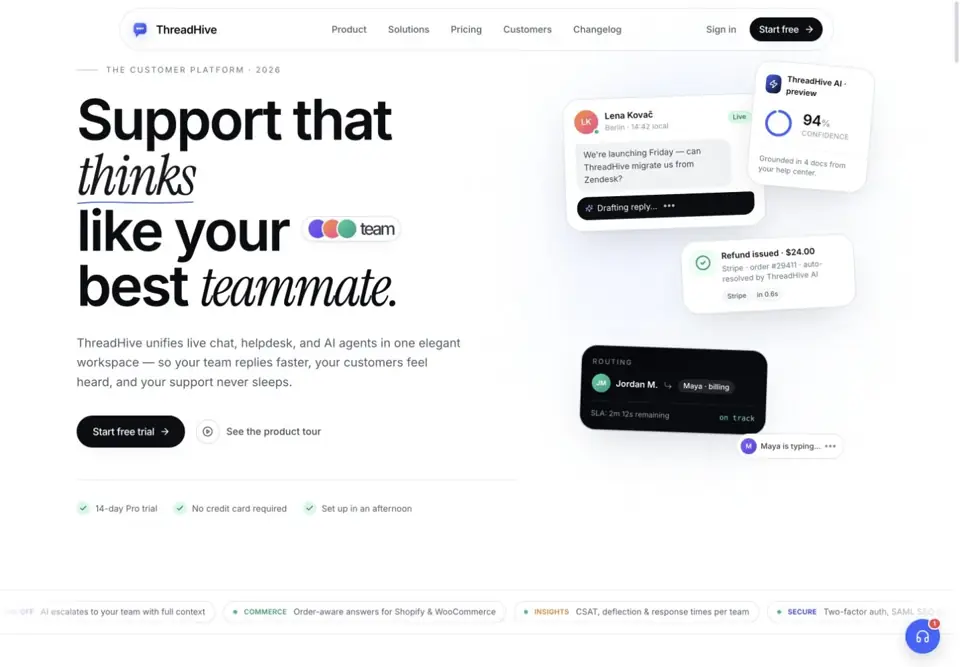
Official website preview Explore the current product, features and plans at ThreadHive.
A few useful answers
It combines live chat, a helpdesk workspace and AI agents. The purpose is to connect automated assistance with the team’s customer support work.
ThreadHive describes answers grounded in help-center content and connected documentation. Teams need to configure and maintain those sources.
Yes. Human handoff with conversation context is part of the published product direction.
The official site lists native iOS and Android chat SDKs. Review the product documentation for the current integration steps.
Your next step starts here.