
Begin with the relationship.
The planned workspace starts with people, their context and a reason to connect.
 BellcastOUTREACH · A BERVYN PRODUCT
In development · Explore the planned experience
A planned workspace for LinkedIn outreach, personal message preparation and follow-ups. Explore the direction as we build.
The idea behind Bellcast
The planned workspace starts with people, their context and a reason to connect.
Personal drafts and organized next steps are at the heart of the proposed outreach experience.
Bellcast is in development. Explore the preview and follow the official site as the idea takes shape.
01 / The planned experience
For independent founders, small sales teams and agencies exploring a more organized outreach workflow.
Notes, interests and a reason to connect.
Browse the sample workspace and campaign screens. Interactions on the public demo do not send messages.
Concept illustration of a product in development. No accounts are connected and no actions are submitted.02 / Where it fits
An upcoming LinkedIn outreach workspace for organizing leads, preparing messages and planning follow-ups, with a desktop companion in development.
Outreach
The planned workspace gives leads and next actions a common home. Explore whether that organization would fit your own process before assuming any account connection is supported.
Outreach
Message drafting is presented as a starting point for a person to review. Relevant context, accurate details and your own voice remain part of the work.
Outreach
The preview shows follow-up sequences and campaign controls. Use it to understand the intended interaction and share feedback about what would make the workflow clearer.
03 / Take a closer look
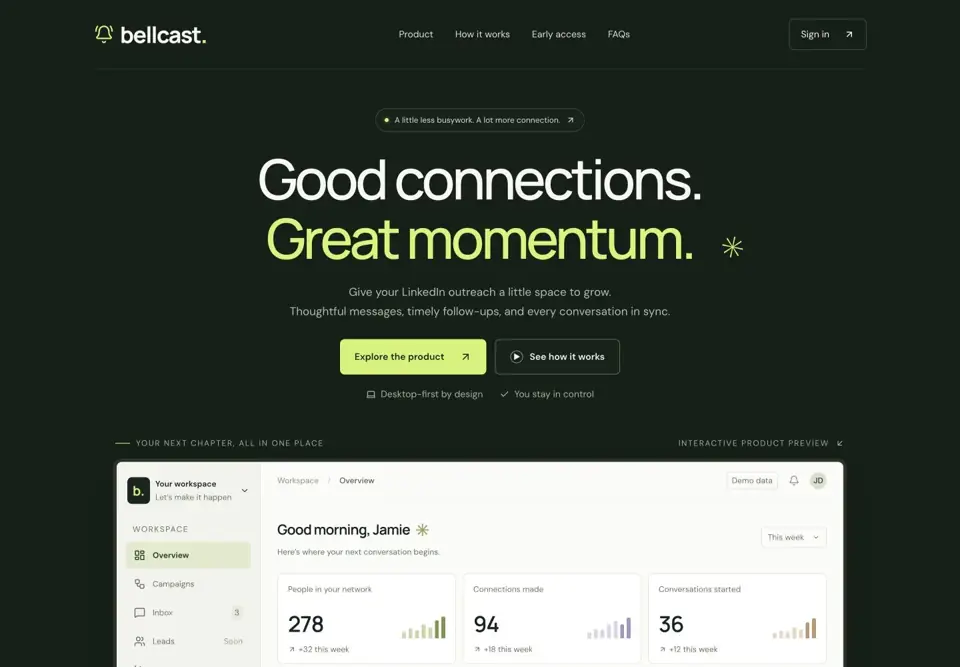
Official website preview Product in development. Follow the official site for release information.
A few useful answers
The public site says account connections and campaign execution are not live. Its interactive preview uses sample data and does not send messages.
The current site says a launch date and paid plans have not been announced. Check Bellcast directly for updates.
The planned local workflow requires the computer to be awake and connected while it runs, according to the product FAQ.
No. Bellcast describes itself as an independent product, not affiliated with LinkedIn.
Follow the idea as it grows.